A lead fills out your Facebook form at 9 p.m. on a Tuesday. By Thursday, you’re not sure whether you called them, who was supposed to, or whether they ever got that listing packet. Nobody dropped the ball on purpose. The ball just had no place to live.
That’s what this release is for. Homesync now has a full lead pipeline for following people from first contact to closed deal, built from new Pipelines, an Insights tab that shows how they’re performing, and a Contacts upgrade that keeps your list clean as it grows.
Pipelines: a board for how you actually work
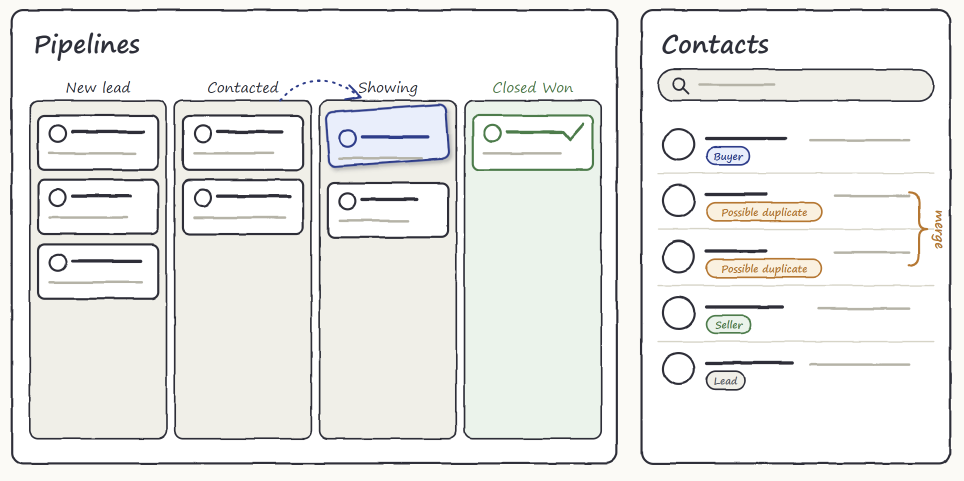
A pipeline is a board: each column is a stage, each card is a deal or a task, and you drag cards forward as work moves. When you create one, you choose what it tracks. A Deals pipeline is for selling. Cards carry a dollar value, the last two stages are Closed Won and Closed Lost, and you get revenue and win rate numbers. A Tasks pipeline is for getting things done, like onboarding a new client. Cards carry points instead of dollars, and there’s no sales scorekeeping to ignore.
You don’t have to start from a blank board, either. Choose Real Estate Buyers, Real Estate Listings, Sales, Dev Cycle or Client Onboarding, and your stages are ready. Templates also come with alerts that nudge you when a card has sat in one stage too long, which is usually the first sign a lead is going cold.
Everything about a deal on one card
Open a card to attach the contacts involved, assign the teammate responsible, set a due date, and add labels. Drop in up to 10 files, 10 MB each, such as photos, PDFs, contracts and spreadsheets. Files stay private, and the links that open them expire. A History tab keeps a plain-language log of what changed and who changed it, so “who moved this?” has an answer.
Drag a deal into Closed Won and confirm what it actually closed for. Drag it into Closed Lost and pick a reason, such as price or timing. A month from now, you won’t be guessing why deals fall through. You’ll have a record.
If you run Facebook Lead Ads, connect a form to a Deals pipeline and new leads arrive as a contact and a deal in your first stage, ready for follow-up.
Pipeline Insights: numbers instead of a feeling
Ask most agents how their pipeline is doing and you’ll hear “pretty good, I think.” The new Insights tab replaces that with open value, wins and losses for the period you choose, a stage funnel that shows where value is parked, and a lost-reasons table that shows why deals slip. Win rate always appears beside the counts behind it, so “1 of 2 closed” never masquerades as a trend. Team activity credits whoever a deal was assigned to when it moved, so a manager dragging someone’s deal forward doesn’t take their credit. Insights shows for team members who have the view analytics permission, so you decide who sees the numbers.
Contacts: duplicate detection and merge
Say you meet Dana at an open house and add her to your contacts. Two weeks later, she fills out your lead form using a different email. Now you have two Danas, two sets of notes, and a real chance you’ll follow up twice or not at all.
Contacts now spots that. A Possible duplicate label shows in your list, a warning appears before you create a contact that looks like one you already have, and CSV imports skip rows whose email is already in your list. A repeat Facebook lead with a known email attaches to the existing contact instead of creating another. When two contacts are really one person, open either and choose Merge contacts. Emails, phone numbers, the timeline, tags and deals move to the one you keep, and your notes are combined so nothing is lost.
You can also now organize people with tags, keep a Notes card that’s always visible, see a read-only Lead details card with the answers from a Facebook form, and switch on Show pipeline activity in a contact’s timeline to see what’s happened to their deals.
Get started with Pipelines and Contacts
Pipelines, Insights and Contacts are available on the Business and Business A.I. plans. Click Pipelines or Contacts in your navigation bar, choose a template, and drag your first card. The Help Center has a short guide for each part, starting with the Pipelines Overview and the Contacts Overview.