📊 Pipelines
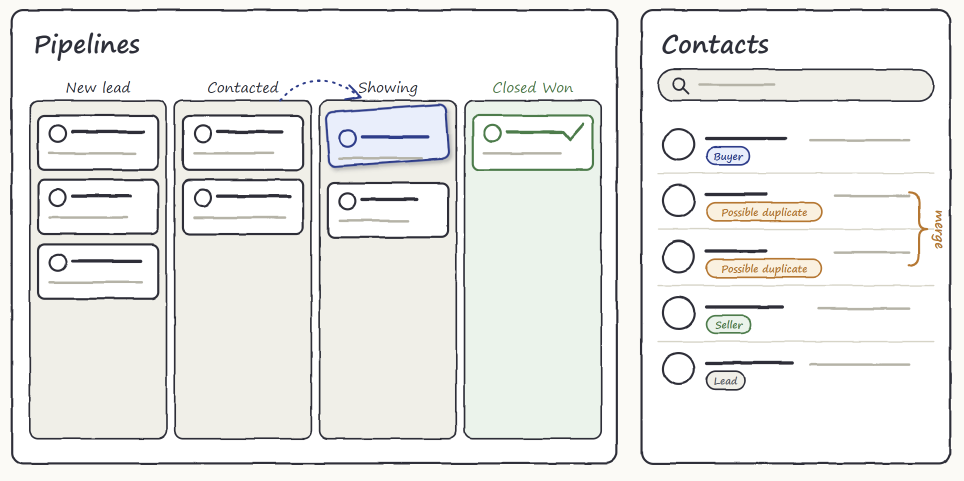
- Added a choice between Deals and Tasks pipelines when creating a pipeline, with starter stages (New Lead and Contacted for Deals, To Do and Done for Tasks)
- Added a Pipelines landing page with five templates: Real Estate Buyers, Real Estate Listings, Sales, Dev Cycle and Client Onboarding
- Added Closed Won and Closed Lost stages for Deals pipelines, with a closing value for wins and a required reason for losses
- Added private file attachments on items: up to 10 files per item, 10 MB each, with expiring links and thumbnails on the board for images
- Added a History tab on every item that shows what changed and who changed it
- Added click-to-edit items that save one field at a time
- Added configurable alerts for items that sit in a stage too long or that an integration adds, up to 10 per pipeline
- Added an option to assign a new item to yourself when you create it
- Redesigned the pipeline header with View, Edit Mode, Archived, Insights and Settings tabs
- Added a Move to stage button on cards and Move Left and Move Right for stages, so boards work without dragging on phones
- Deleting a stage or a pipeline now also deletes its items and attachments, and the confirmation says so
📈 Insights
- Added an Insights tab with open value, wins, losses, win rate, a stage funnel and lost reasons for Deals pipelines
- Added Team activity showing the deals each person opened and moved through each stage
- Added a lighter Insights view for Tasks pipelines: items per stage, overdue items and items per person
🎯 Facebook Leads
- Added Lead sources on each Deals pipeline, so you choose which Facebook page and form sends leads where
- Added a status on each lead source that shows when a page needs to be reconnected
- Added a “Notify me when a lead arrives” setting on each Facebook page, on by default
- Repeat leads with a known email now attach to the existing contact instead of creating a duplicate
- Facebook leads can now only be sent to Deals pipelines
👥 Contacts
- Added tags, a Manage Tags dialog and a tag filter in contact search
- Added an always-visible Notes card, and a read-only Lead details card for Facebook lead answers
- Added a Possible duplicate label, a warning when you create a contact that looks like an existing one, and skipping of duplicate rows in CSV imports
- Added Merge contacts to combine two contacts into one
- Added editing for phone call and meeting notes, Facebook lead entries and Load more on the Activity timeline
- Added a Show pipeline activity switch that adds deal activity to a contact’s timeline
- Added a Pipelines panel on each contact
- Redesigned the contacts list header and added a clear message when a search has no matches
🔐 Permissions
- Added the view analytics permission for the Insights tab. Roles that can already manage pipelines receive it automatically
- Opening pipeline attachments now requires the view pipelines or manage pipelines permission